TL;DR:
- Most enterprise AI project failures result from orchestration, integration, and operational failures, not model performance.
- Building durable, cross-system integrated workflows with proper governance and resilient execution layers is essential for real-world scalability and compliance.
Most enterprise AI projects don’t fail because the AI model underperforms. They fail because the plumbing around the model, the orchestration, the integrations, the approval gates, collapses under real operational conditions. If you’re a business or IT leader evaluating how to build a prototype AI workflow automation product for your organization, the challenge isn’t proving AI can do something useful in a demo. It’s proving it can hold up when a downstream API times out, a human approver is unavailable, and three departments need an audit trail simultaneously. This guide gives you the architecture, tools, and execution path to do exactly that.
| Point | Details |
|---|---|
| Orchestration durability | Ensure your AI workflows can pause and resume without losing state to avoid common production failures. |
| Cross-system integration | Use cross-system MCP architecture to unify data across enterprise systems for seamless AI workflow execution. |
| Governance and audit | Implement runtime governance with approvals and audit trails to maintain compliance and operational control. |
| Operational costs | Plan for dedicated process owners and human oversight as part of total AI workflow automation expenses. |
| Prototype before scaling | Build and test prototypes with layered architecture to reduce risks and optimize workflows before enterprise rollout. |
Before you write a single line of automation logic, you need to understand why so many enterprise AI workflow deployments stall between proof-of-concept and production. The answer almost never involves the AI model itself.
Production failures in agentic systems stem overwhelmingly from orchestration issues rather than model performance. Retries that loop infinitely. Timeouts that leave workflows in a partially executed state. Missing audit trails that make compliance teams nervous. These aren’t edge cases. They are the standard failure modes of first-generation enterprise AI automation.
“The bottleneck isn’t intelligence. It’s infrastructure. An AI agent that can reason beautifully but can’t recover from a failed API call is a liability, not an asset.”
The second major failure point is integration complexity. Most large enterprises operate dozens of systems: CRM, ERP, ITSM, HR platforms, legacy databases. When AI agents call each of these systems independently through isolated APIs, you accumulate a serious problem called context bloat. Each system call adds latency, token usage, and error surface area. The agent loses coherence, and errors compound.
Common enterprise AI automation problems include:
Understanding these enterprise AI challenges and solutions at the root level is what separates organizations that prototype once and scale versus those that prototype repeatedly and stall. With this foundation clear, the next step is selecting the right architectural building blocks.
Architecture decisions made at the prototype stage tend to calcify. Choose poorly now and you will pay for it at scale. Two architectural choices in particular define whether your prototype AI workflow automation product will survive contact with production reality.

The first is your integration layer. Cross-system MCP architecture is emerging as the standard for AI connectivity in enterprise environments. MCP, the Model Context Protocol, allows AI agents to access structured data from enterprise systems. But the key distinction is how that access is structured. Isolated MCP servers, one per system, create exactly the fragmentation problem described above. A cross-system approach unifies context from your CRM, ERP, and legacy databases in a single coordinated request, dramatically reducing latency and orchestration errors.
The second is your orchestration layer. Platforms built on durable execution engines, such as Temporal, allow workflows to pause, persist state, and resume without data loss. This is not a nice-to-have feature. It is the architectural requirement that determines whether your automation survives real-world conditions.
| Architecture component | What to look for | Why it matters |
|---|---|---|
| Integration layer | Cross-system MCP, unified context | Prevents context bloat and API chaining errors |
| Orchestration engine | Durable execution, state persistence | Enables pause, retry, and replay without data loss |
| Governance layer | Human approvals, audit trails, RBAC | Ensures compliance and operational control |
| Connectivity catalog | Pre-built connectors to Salesforce, SAP, Slack, etc. | Reduces integration build time significantly |
Tools worth evaluating for your connectivity layer include SnapLogic MCP servers, which provide governed MCP connectivity for enterprise systems. On the orchestration side, platforms with Temporal-based durable workflows give you the pause-and-resume capability your production environment will eventually demand.
Pro Tip: Before committing to an orchestration platform, run a fault injection test during your prototype phase. Deliberately trigger a timeout or API failure mid-workflow and observe whether state is preserved. If the platform can’t recover gracefully in a test, it won’t recover gracefully in production.
Aligning these choices with your enterprise AI governance practices from the start avoids retrofitting controls later, which is both expensive and operationally disruptive. And always align AI projects with business goals before finalizing your architecture so the prototype solves a real operational problem, not a technical curiosity.
With your architecture defined, execution becomes a structured build process. This is where most teams either gain momentum or accumulate technical debt they’ll spend months unwinding.
Follow this sequence when building your first prototype AI workflow automation product:
Production-ready agentic workflows require a layered architecture: connectivity at the base, business logic in the middle, and runtime governance at the top. Skipping or thinning any layer creates a workflow that works in demos but fails in operations.
Key governance controls to embed during the build:
Pro Tip: Build your approval routing logic to handle approver unavailability from day one. If your workflow assumes a human will always respond within four hours, it will break on the first public holiday. Design for asynchronous human interaction with configurable timeout escalation paths.
To see how AI workflow automation translates into measurable business value, apply AI workflows effectively by grounding your prototype in a documented business process that already has a clear performance baseline.
| Workflow layer | Primary function | Failure risk if omitted |
|---|---|---|
| Connectivity (MCP) | Unified access to enterprise systems | Context errors, high latency, API failures |
| Business logic (orchestration) | Decision-making, routing, retries | Stuck workflows, data loss, uncontrolled loops |
| Runtime governance | Approvals, guardrails, audit trails | Compliance exposure, undetectable errors |
A prototype that hasn’t been deliberately broken hasn’t been properly tested. Verification for AI-driven workflow systems goes beyond functional testing. You need to test for durability, compliance, and operational behavior under realistic failure conditions.
Start with fault injection testing:
The ability to pause, audit, and replay AI processes is the primary differentiator for enterprise automation platforms in 2026. If your chosen platform can’t demonstrate replay capability in your prototype environment, reconsider it before you invest further.
Pro Tip: Include compliance stakeholders in your verification phase, not just technical reviewers. An audit trail that satisfies an engineer may not satisfy a compliance officer. Discovering that gap during prototype testing costs far less than discovering it after production deployment.
Use this comparison framework when evaluating orchestration platforms for scale readiness:
| Evaluation criterion | What strong platforms provide | Red flag |
|---|---|---|
| Observability | Real-time execution monitoring, step-level logging | No native dashboards or requires third-party tools |
| Fault tolerance | Automatic retries with exponential backoff, state persistence | Manual recovery required after failures |
| Human-in-the-loop | Native approval routing with configurable timeouts | Requires custom development to add approvals |
| Deployment model | Cloud, on-premise, and hybrid options | Single deployment model only |
| Audit capability | Immutable logs with replay | Logs are mutable or incomplete |
Monitoring AI workflows effectively requires dedicated observability tooling, not ad hoc log searches. And as you move toward production scale, secure AI workflow operations with zero-trust principles, particularly around agent identity and data access, become non-negotiable.
Most enterprise teams approach AI workflow automation as a model selection problem. They spend weeks evaluating which large language model produces the best outputs, then discover six months later that their workflow fails in production not because the model reasoned incorrectly, but because a single API timeout caused an unrecoverable state and the whole process had to restart manually.
Production failures stem from orchestration and integration, not from model shortcomings. Yet enterprise budgets and attention remain disproportionately focused on model quality. This is a strategic miscalibration that costs organizations real money.

Here’s what we’ve observed consistently: shallow MCP implementations that chain isolated server calls create brittle integrations that work perfectly in sandbox environments and fail unpredictably in production, usually when transaction volume spikes or a connected system has a maintenance window.
The organizations that achieve durable AI workflow automation share one characteristic. They invest in the infrastructure layer first: durable execution, cross-system context management, and runtime governance. Model selection comes second. That sequencing feels counterintuitive to teams that have been sold on AI capability as the differentiator. But it’s the right order.
Operational overhead is the other factor that traditional planning consistently underestimates. A well-governed AI workflow requires process owners who monitor outputs, manage exceptions, and update workflow logic as business rules evolve. That labor cost is real, recurring, and scales with the number of automated processes you run. Setting clear objectives for AI success before prototyping forces these cost conversations to happen at the planning stage rather than the budget review stage.
The enterprises that get this right treat their prototype not as a demo vehicle but as a production stress test. Every failure during the prototype phase is valuable data. Every gap in governance is a compliance incident you avoided. That mindset, more than any specific tool choice, is what separates successful AI workflow programs from expensive experiments.
Hymalaia 🏔️ is built for exactly the challenges this guide describes: orchestrating AI agents across complex enterprise environments with full governance, audit control, and cross-system connectivity. If you’re ready to move from prototype to production-ready AI workflow automation, the Hymalaia enterprise AI agent platform gives you the infrastructure to do it confidently.
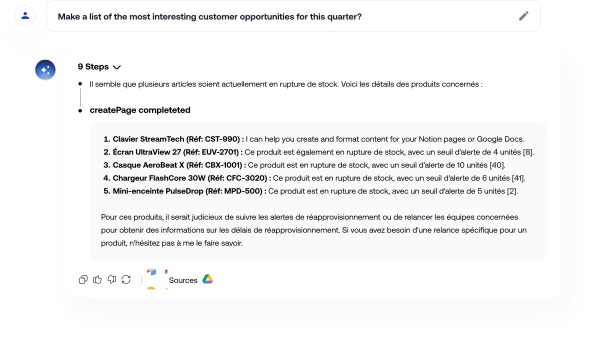
Hymalaia connects with over 50 enterprise tools, including Salesforce, Slack, Google Workspace, and SharePoint, unifying data access through a governed integration layer that eliminates the fragmentation problems outlined above. Built-in human-in-the-loop controls, RBAC, and immutable audit logging mean your compliance requirements are addressed at the platform level, not bolted on afterward. Explore the full Hymalaia platform features and see how enterprise AI optimization translates into measurable operational efficiency. Book a demo and bring your prototype workflow to production faster.
It’s an early-stage implementation of AI-driven process automation, built to test orchestration logic, integration connectivity, and governance controls before full enterprise deployment. Think of it as a production stress test, not a demo.
Durable orchestration allows workflows to pause, persist their state, and resume after failures, preventing the cascading errors that arise from incomplete retries or lost context. Most agentic failures trace back to orchestration gaps, not model limitations.
MCP, the Model Context Protocol, lets AI agents access structured enterprise data. Cross-system MCP architecture prevents context bloat and orchestration errors that occur when agents chain calls across multiple isolated MCP servers, each adding latency and failure risk.
Runtime governance embeds human approval gates, behavioral guardrails, and audit trails directly into workflow execution. Platforms that prioritize governance deliver approvals, guardrails, and audit controls that make AI workflows both compliant and operationally safe from day one.
Beyond subscription fees, enterprises must account for operational overhead including dedicated process owners, human-in-the-loop oversight staffing, workflow maintenance as business rules change, and the integration engineering required to keep connected systems in sync.
