Secured agentic Platform to turn
business
knowledge into action
The enterprise AI platform where teams build
and deploy AI agents
to turn knowledge into action at scale
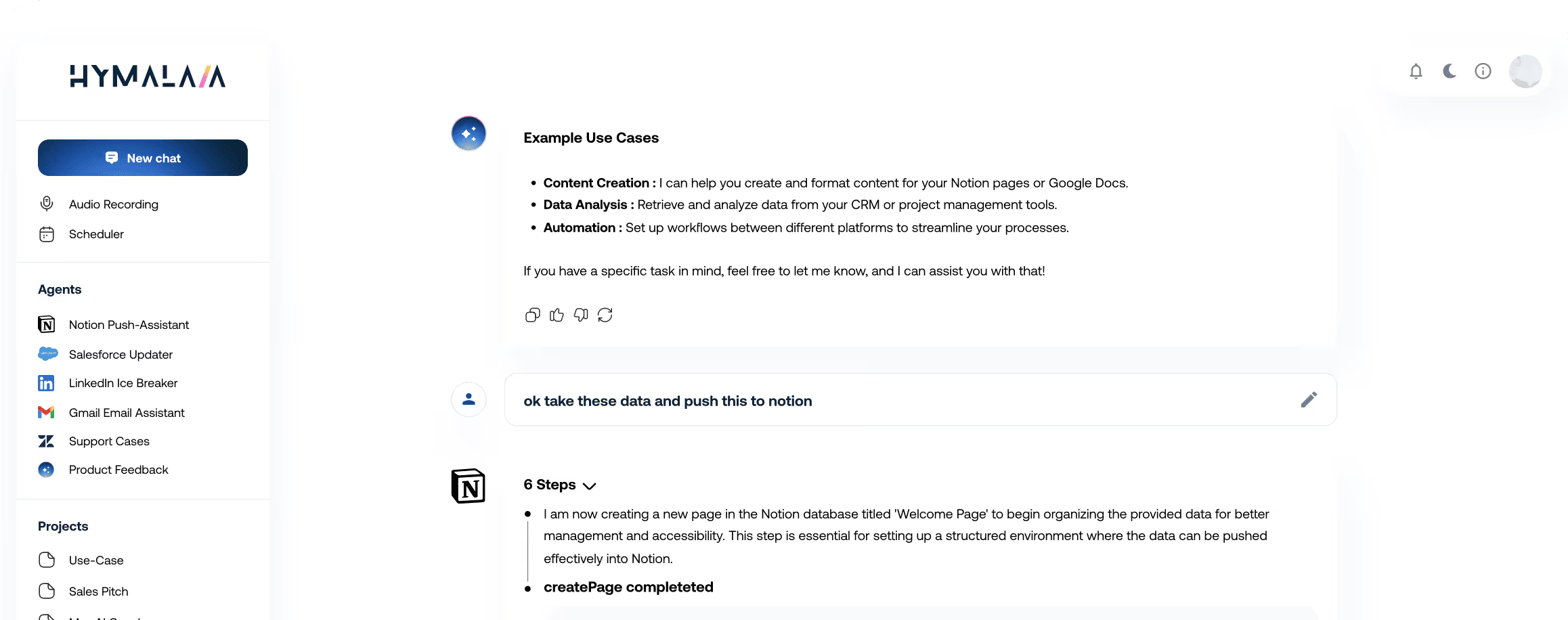
The enterprise AI platform where teams build
and deploy AI agents
to turn knowledge into action at scale






Accelerate decisions with AI agents that connect your systems,
surface insights, and execute automatically
Instantly access all your business data. Our enterprise AI agent platform uses advanced RAG and 50+ connectors (Salesforce, Slack, Google Workspace, and more) for accurate, grounded answers from your actual data, not generic AI.


Report on performance metrics and complex data points. Receive AI-guided recommendations and analysis. Democratise data analytics and empower teams to operate at AI speed.
Schedule agentic AI to execute cross-platform tasks and maintain real-time data synchronisation across CRMs, ERPs, and all business tools. Enable high-performance teams to act 24/7.
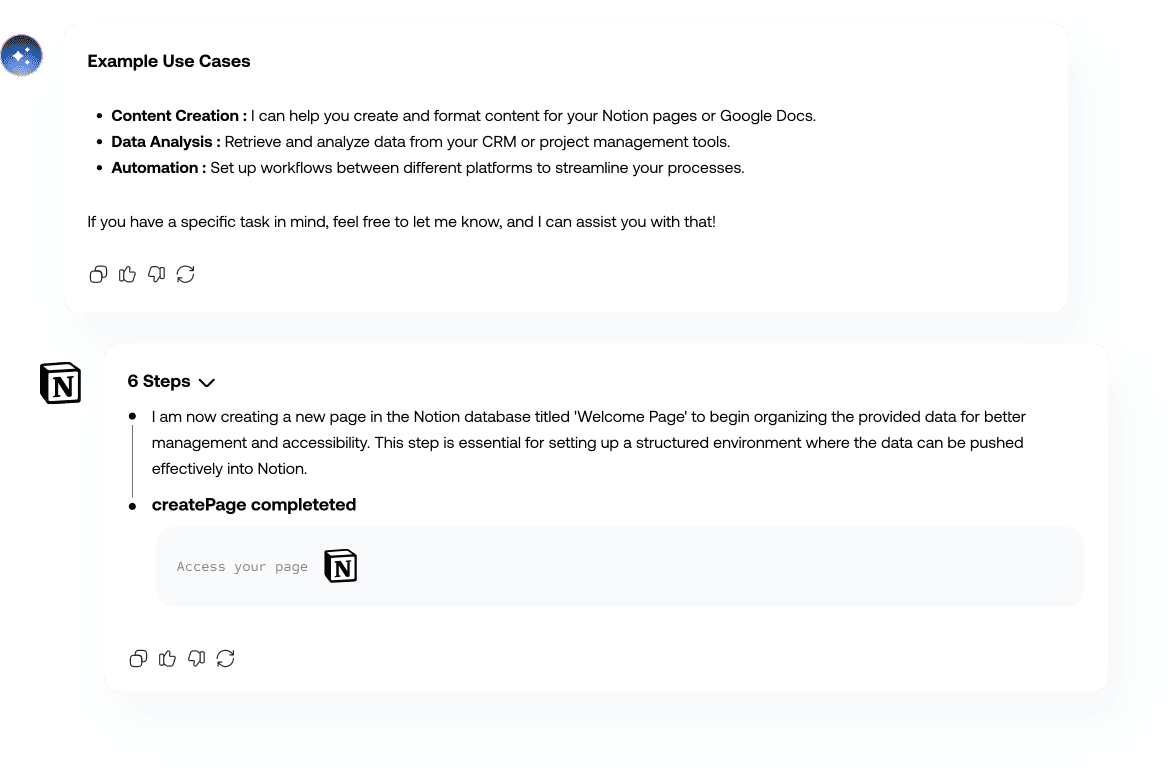







Hymalaia connects 50+ native tools, APIs, and databases into one unified agentic platform.
Instantly index data from Salesforce, Slack, Google Workspace and more.




%201.svg)


%201.svg)

%201.svg)


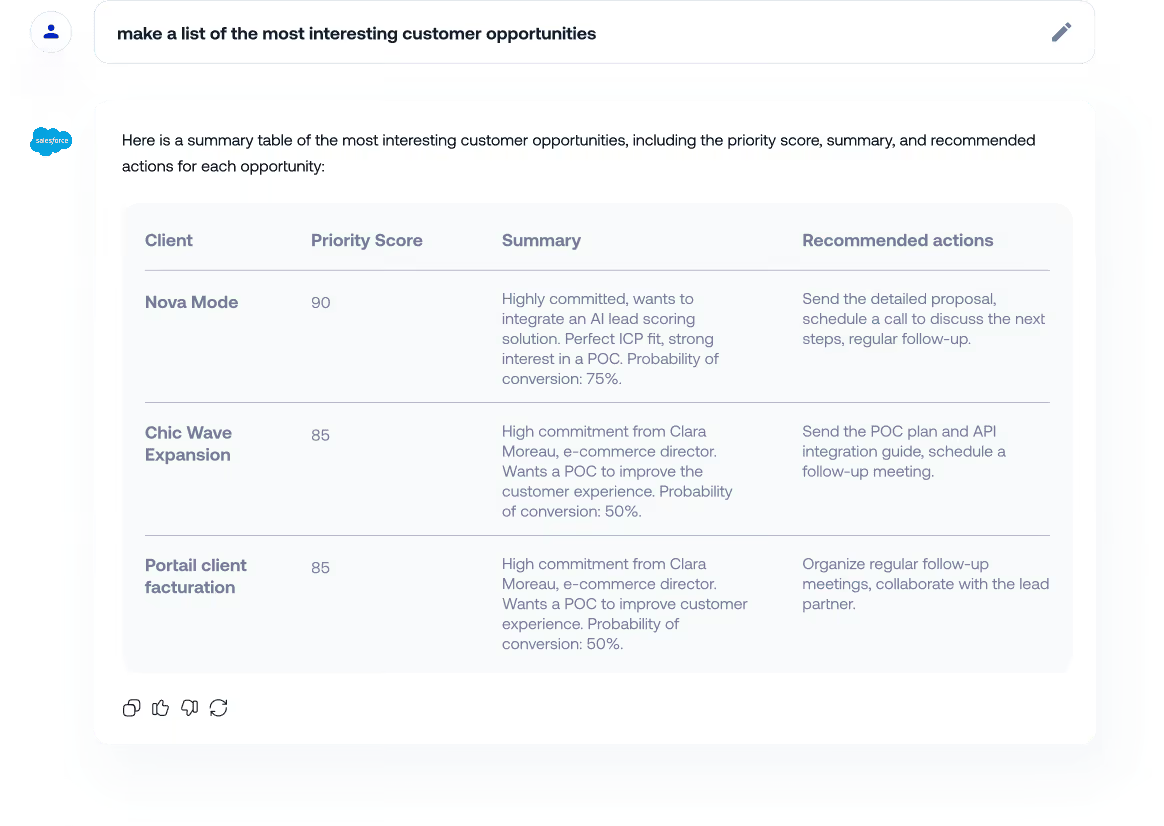
Track and prioritize client opportunities in real-time to accelerate deal closure


Reduce proposal response time by automating content retrieval and document assembly.


Schedule and prepare follow-up calls with context from previous interactions.


Analyze prospect data to identify pain points and tailor messaging for higher conversion.

Close more deals faster with AI agents that unify
customer intelligence, surface insights,
and automates tasks.
Featured use cases. Contact us for more

Combine multiple reports into a single beautiful dashboard.

Don’t worry about the data, always be synchronized
Automatically categorize, prioritize, and route customer tickets to reduce response time.


Give agents instant access to accurate product information and procedures to resolve issues faster.

Streamline customer onboarding workflows with guides responses.

Identify at-risk customers early by analysing engagement patterns and usage data to enable retention.

Resolve issue faster and prevent chum with agents that automate routing, deliver answers
and predict risks.
Featured use cases. Contact us for more
Combine multiple reports into a single beautiful dashboard.
Don’t worry about the data, always be synchronized
Streamline customer onboarding workflows with automated guidance and issue resolution.
Serve as the first point of contact for product information across teams.

Provide instant visibility into stock levels to prevent overselling and inform customer conversations.


Give agents instant access to accurate product information and procedures to resolve issues faster.
Eliminate cross-department bottlenecks and manual processes with agents that coordinate workflows accross all teams.
Featured use cases. Contact us for more
Combine multiple reports into a single beautiful dashboard.
Don’t worry about the data, always be synchronized
Transform client conversations into actionable specifications and development tickets automatically.


Create well-structured user stories from requirements to accelerate sprint planning.
Serve as the first point of contact for product information across teams.
Automate feature announcement creation for internal and external stakeholders.

Ship features faster with agents that automate
specifications, capture requirements, distribute
knowledge, and generate release communications.
Featured use cases. Contact us for more
Combine multiple reports into a single beautiful dashboard.
Don’t worry about the data, always be synchronized
Generate weekly performance reviews automatically from sales data stored in your datawarehouse

Monitor competitor activities and market trends to inform strategic positioning.
Aggregate marketing insights and campaign performance data for strategic decision-making.
Identify at-risk customers early by analyzing engagement patterns and usage data to enable proactive retention.
Make strategic decisions with unified
intelligence that aggregates performance date,
competitive insights, and customer signals.
Featured use cases. Contact us for more
Combine multiple reports into a single beautiful dashboard.
Don’t worry about the data, always be synchronized

Since connecting AI Agents to Notion, Slack, and Zendesk, the impact has been clear. Our teams stopped searching and now get grounded answers instantly from our actual data. Support and onboarding both accelerated significantly and became more consistent, with fewer internal questions, fewer errors, and faster responses to customers.


Before Hymalaia, we were constantly searching for sector information. Now we get industry trend updates automatically. We give clients current data quicker and we can anticipate what they're going to need.


Hymalaia connects our databases, SharePoint, and CRM so we can access everything from one spot. We stopped wasting time searching and now get to information instantly. It's helped both our internal teams and how we serve clients, and we've seen real productivity gains.

Close more deals faster with AI agents that unify customer intelligence,
surface insights, and automate tasks.
Track and prioritize client opportunities in real-time to accelerate deal closure


Reduce proposal response time by automating content retrieval and document assembly.


Provide instant visibility into stock levels to prevent overselling and inform customer conversations.
Generate weekly performance reviews automatically from sales data stored in your datawarehouse to identify trends and coaching opportunities.


Self-service data analytics software that lets you create
visually appealing data visualizations and insightful
dashboards in minutes.
Combine multiple reports into a single beautiful dashboard.
Don’t worry about the data, always be synchronized
The enterprise AI platform enabling companies to build AI agents on what matters and turn knowledge into action at scale
Data Protection: Secure your enterprise AI agent platform. GDPR-compliant, AES-256 encrypted storage.
Enforce role-based access, agent controls, and policy guardrails, ensuring zero data leaks and safe, compliant AI use across every model.
Define who acts, how agentic AI operates, and which LLMs are used. Granular RBAC (Role-Based Access Control) aligned to your organisational structure.
Deploy on cloud, on-premise, or hybrid infrastructure via Kubernetes. This containerized architecture scales elastically to support large teams, high data volumes, and demanding enterprise AI workloads.
Seamlessly link your data sources, authentication layers, and business applications via 50+ enterprise connectors. Enable permissioned access to your entire data stack.
Security & Access Management: Support for SSO, RBAC, OIDC/SAML, and encrypted audit logs. Every access to the enterprise AI agent platform is logged.
Ask anything to your datawarehouse in natural language
Additional Sales Team Efficiency leveraging meeting notes and transcripts
Saved per year and per employee on key product, and information findings
An AI assistant and an AI agent don’t play the same role in your organization.
What Is an AI Assistant?
An assistant is mainly focused on conversation and information access:
- Answers questions in natural language
- Searches for information in your data (FAQ, knowledge base, CRM, documentation, etc.)
- Helps write emails, summaries, tickets, reports, and internal documentation
- Does not usually take complex autonomous actions in your tools
In short, an AI assistant is centered on information retrieval and content generation.
What Is an AI Agent?
An AI agent goes further: it reasons, makes decisions, and takes actions in your systems.
- Connects to your tools (Salesforce, Dynamics,Zendesk, GitHub, Jira, Notion, etc.)
- Follows predefined workflows (create/update tickets, answer customers, escalate to humans…)
- Chains several steps: read data → analyze → decide → execute
- Can run in human-in-the-loop mode (agent proposes, human validates) or in full automation
An AI agent doesn’t just answer questions; it executes business tasks based on your data and internal rules.
The time it takes to connect your data depends mainly on your data sources and existing access rights.
1. Fastest Connections (Minutes to a Few Hours)
Some integrations are almost “plug-and-play”:
- Slack / Microsoft Teams – OAuth connection, choose workspaces or channels
- Google Drive / SharePoint / OneDrive – connect drives, folders, and files
- Notion / Confluence / knowledge bases – connect workspaces and spaces
- Indexed web pages – add your public website or documentationIn these cases, you can start testing the AI agent the same day.
2. Standard Business Tools (A Few Hours to a Few Days)
For CRM, support, and project tools:
- HubSpot, Salesforce, Zendesk, Intercom, Jira, GitHub, Airtable, etc.
Most of the time is spent on:
+ Internal validation for access (security / IT)
+ Selecting which objects to sync (tickets, deals, contacts, projects…)
+ Defining access rules (which teams see what)
And in most cases, you can have a working MVP in 2–5 business days.
3. Custom Integrations (A Few Days to a Few Weeks)
For internal tools (homegrown apps, proprietary databases, custom APIs), we can build a custom connector:
- Connection via REST API, database, or middleware
- Definition of your business workflows (e.g. “if urgent ticket → create incident in Jira + notify on Slack”)
- Implementation of security policies and logging
Typically, a full project (from connection to first agents in production) is done in weeks, not months.
RAG stands for Retrieval-Augmented Generation. It’s an AI approach that allows the agent to use your up‑to‑date company data instead of relying only on what the model learned during pre‑training.
Why Is RAG Important for an AI Agent?
- Answers based on your real content
The agent uses your documents (Google Drive, SharePoint, Notion, Confluence…), tickets (Jira, Zendesk), emails (Outlook), indexed web pages, etc.
- Reduces hallucinations
Instead of “making up” answers, the agent grounds its responses in your actual data.
- Keeps answers always up to date
As soon as you update a process, an offer, or a policy, the agent’s next answer can reflect that change.
- Adapts answers to context
The agent can combine multiple sources (e.g. CRM + internal notes + product FAQ) to generate a contextual response.
How Does RAG Work in Practice?
1. A user asks a question in natural language
2. The agent retrieves the most relevant passages from your data (retrieval)
3. The language model generates an answer based on those retrieved passages (generation)
4. The agent can show the sources it used (documents, tickets, pages) for transparency
RAG is essential to build a reliable AI agent aligned with your data and business rules, instead of a generic chatbot.
Yes. We can add new connectors even if they don’t appear in the default list.
Different Ways to Connect Your Tools
1. Integrations via Model Context Protocol (MCP)
We can integrate new data sources via the Model Context Protocol (MCP).
This allows us to:
- Expose external systems and APIs as structured tools for the agent
- Securely retrieve and update data from your applications
- Quickly plug in internal or niche tools without building a full custom connector from scratch
If your system can be accessed through MCP, we can make its data available to the agent and use it in workflows, reasoning, and automation.
2. Classic data File Import
For simpler use cases, you can also provide:
- CSV / Excel files
- PDFs, Office documents, exported Google Docs/Sheets
These files can be indexed and used by the RAG system.
3. Custom API-Based Connector
If your tool has an API we can create a connector that allows the agent to:
- Read the necessary data (tickets, leads, projects, documents…)
- Create or update records according to your workflows
- Respect your permissions and security mode
Typical Process for a New Connector
- Quick analysis of your tool and its API / schema
- Definition of the use cases and data needed
- Implementation of the connector (read + write if needed)
- Configuration of permissions (which users/teams see what)
- Tests in a limited environment before broader rollout
Yes. Your AI agent can work even if your data is not perfectly “clean” or structured.
In fact, one of the main benefits of an AI agent is to make messy, scattered information usable.
What the Agent Can Handle Even with “Dirty” Data
- Unstructured documents: PDFs, slide decks, meeting notes, emails
- Multiple sources: Slack, Teams, Outlook, Notion, Google Drive, SharePoint, etc.
- Various formats: product sheets, internal procedures, support tickets, project docs, etc.
- Redundant or multiple versions: the agent can surface the most relevant and recent content.
How the Agent Helps Improve Data Quality Over Time
- Centralizes search across all your sources
- Surfaces the most relevant and up‑to‑date content
- Helps you detect inconsistencies (conflicting procedures, outdated docs…)
- Can be configured to ignore certain folders/spaces that are unreliable or obsolete
When Data Cleaning Becomes Useful
A full cleanup is not required, but it’s useful if:
- You have content that should never be used (retired offers, deprecated processes, expired legal docs)
- You want to enforce “golden” sources (official documentation, validated procedures)
- You operate under strict compliance rules (legal, healthcare, finance)
In those cases, we can help you define which sources the agent should prioritize or exclude, without requiring a complete data restructuring before you start.
Who can create and manage agents depends on how you structure roles and permissions in your organization.
Typical Roles Involved in Agent Creation
- Admins / IT Teams / Champions
+ Manage connectors and permissions (access to CRM, drives, internal tools, etc.)
+ Validate test and production environments
Operations / Business Owners / Knowledge Managers / Product Owners
- Define the use cases (customer support, internal support, onboarding, lead qualification, etc.)
- Configure business workflows (what the agent should do, when, and for whom)
Organize content sources (FAQ, knowledge bases, procedures)
Validate responses, examples, and tone of voice
Role-Based and Team-Based Control
You can define:
- Who can create or edit an agent
- Who can deploy an agent to production
- Who can use the agent in daily workflows
- Which agents are visible to which teams (Support, Sales, Customer Success, IT, HR…)
The goal is to let business teams design and own their AI agents, while IT and security keep control over permissions and connections to sensitive systems.
For data warehouses and databases, you usually don’t need a new specific connector.
We address these systems via our SQL query model, which allows the agent to:
- Run controlled, parameterized SQL queries on your warehouse
- Retrieve the data needed for analytics, reporting, or decision‑making
- Use query results inside reasoning chains and automated workflows
Because this is handled through our SQL layer, we don’t require a bespoke connector for each warehouse technology.
On top of automatic header and structure understanding of your documents, the platform can leverage a data catalog to enrich the context passed to the agent via RAG (Retrieval‑Augmented Generation).
Built‑In Data Visualization
On top of querying your warehouse, the agent can also provide data visualization:
- Generate charts and graphs (bar charts, line charts, pie charts, tables, etc.) from SQL query results
- Help you quickly explore trends, anomalies, and KPIs without leaving the interface
- Adapt visualizations to your question (“Plot this over time”, “Break this down by region”, “Show a comparison by owner”)
Users can search for information in natural language, get structured answers backed by SQL, and instantly see the data as visuals, making your database or data warehouse a true interactive analytics layer powered by AI.
Some people search for Hymalaia using the spelling ‘Himalaya’. The correct brand name is Hymalaia, the enterprise AI agent platform to find, analyze, and act on business knowledge.


.avif)
We care about your data, and we'd use cookies only to improve your experience. By using this website, you accept our cookie policy. Learn More.
