TL;DR:
- Implementing single sign-on (SSO) for enterprise AI platforms centralizes authentication and enforces access policies. Proper configuration using protocols like SAML 2.0 or OIDC ensures secure, seamless user management and reduces security risks. Ongoing governance and continuous evaluation of identity provider integrations are essential for maintaining security and compliance.
Single sign-on (SSO) setup for an enterprise AI platform is the process of connecting a corporate identity provider (IdP) to centralize authentication, enforce access policies, and automate user lifecycle management across all AI tools. The industry standard term for this practice is enterprise identity federation, and it runs on two dominant protocols: SAML 2.0 (Security Assertion Markup Language) and OIDC (OpenID Connect). Without it, offboarded users can retain AI platform access for six weeks or more due to manual revocation delays. Identity providers like Okta, Azure Active Directory, Ping Identity, and OneLogin are the primary tools enterprises use to execute this integration. Getting the configuration right from day one protects your data, satisfies auditors, and keeps your AI deployment governable.
The first thing to confirm is protocol compatibility. Leading AI platforms including ChatGPT Enterprise, Claude Enterprise, Microsoft Copilot, and Google Gemini support native SAML 2.0 integration, but consumer-tier accounts generally do not. Before you touch a configuration screen, verify your AI platform’s enterprise tier supports SAML 2.0, OIDC, or both.
Here is what you need in place before starting:
The table below maps each prerequisite to the specific risk it mitigates.
| Prerequisite | Risk Mitigated |
|---|---|
| Enterprise license with SAML/OIDC support | Prevents fallback to password-based auth |
| Global Admin role on IdP | Avoids partial config that breaks login flows |
| Domain verification | Stops home realm discovery failures |
| Metadata exchange | Prevents assertion mismatch errors |
| Test user account | Catches misconfiguration before production rollout |
Centralizing authentication via SSO reduces password reuse risks and shrinks the phishing attack surface across all connected AI tools. That single fact justifies the setup effort for most security teams.

The configuration process follows a consistent sequence regardless of whether you use SAML 2.0 or OIDC. The steps below apply to most enterprise AI platforms when connecting to Okta, Azure AD, or Ping Identity.
Create the application registration in your IdP. In Okta or Azure AD, add a new SAML or OIDC application. Enter the AI platform’s Assertion Consumer Service (ACS) URL and Entity ID, both found in the platform’s SSO settings panel.
Download or copy the IdP metadata. For SAML, export the XML metadata file. For OIDC, copy the discovery endpoint URL. Paste this into the AI platform’s identity provider configuration field.
Map SAML attributes or OIDC claims. At minimum, map email, firstName, and lastName. For role-based access, add a groups attribute. Role mapping between IdP groups and platform roles is what gives you granular permissions inside the AI agent environment, not just a login gate.
Enable Just-in-Time (JIT) provisioning. JIT provisioning creates user records automatically on first SSO login, removing the need for manual account creation and improving onboarding at scale.
Configure home realm discovery. Add your verified corporate domain so the platform routes users to the correct IdP automatically. Home realm discovery automates login routing based on email domain, which matters most in multi-tenant or multi-brand environments.
Set up both SP-initiated and IdP-initiated flows. SP-initiated means the user starts at the AI platform and gets redirected to the IdP. IdP-initiated means the user clicks a tile in Okta or Azure AD and lands directly in the platform. Both flows need testing.
For AI agent integrations, configure OAuth 2.0 token exchange. Use the on-behalf-of flow so downstream systems see the individual user’s identity rather than a shared service account. This prevents AI agents from gaining blanket access to connected systems like Salesforce or SharePoint.
Run end-to-end validation. Log in as your test user via both flows. Confirm the correct role is assigned, JIT provisioning fired, and the session token contains the expected claims.
Pro Tip: For new AI platform deployments, prefer OIDC over SAML. OIDC uses JSON Web Tokens with better library support and simpler debugging compared to SAML’s XML assertions, and it has native mobile support that SAML lacks.
Even well-planned configurations hit problems. Knowing the failure patterns in advance saves hours of back-and-forth with your IdP vendor.
Metadata mismatch errors. The Entity ID or ACS URL in the IdP does not match what the AI platform expects. Always copy these values directly from the platform’s settings page rather than typing them manually.
Token expiration breaking sessions. Short-lived SAML assertions or OIDC access tokens cause users to be logged out mid-session. Set refresh token lifetimes to align with your organization’s session policy, typically 8–12 hours for a standard workday.
Home realm discovery failures. Users land on a generic login page instead of being routed to the corporate IdP. This almost always means domain verification is incomplete or the domain was added to the wrong tenant in Azure AD.
Multi-tenant configuration conflicts. Enterprises running multiple Azure AD tenants or Okta orgs need to map each tenant to a distinct application registration. Mixing tenant metadata causes authentication loops.
Service account misuse in AI agent flows. Teams sometimes configure AI agents to authenticate with a shared service account rather than individual user tokens. This creates a single point of compromise and bypasses per-user permission rules. Use OAuth 2.0 token exchange instead.
MFA not enforced at the AI platform level. SSO signals to risk teams that AI platforms comply with existing enterprise security postures, but only if conditional access policies in Okta or Azure AD actually require MFA for the AI application. Verify this in your IdP’s policy engine, not just in the AI platform’s settings.
Pro Tip: Use your IdP’s built-in SAML tracer or the OIDC debugger in Azure AD’s sign-in logs to capture the raw token payload. Reading the actual assertion tells you exactly which attribute is missing or malformed, which cuts troubleshooting time significantly.
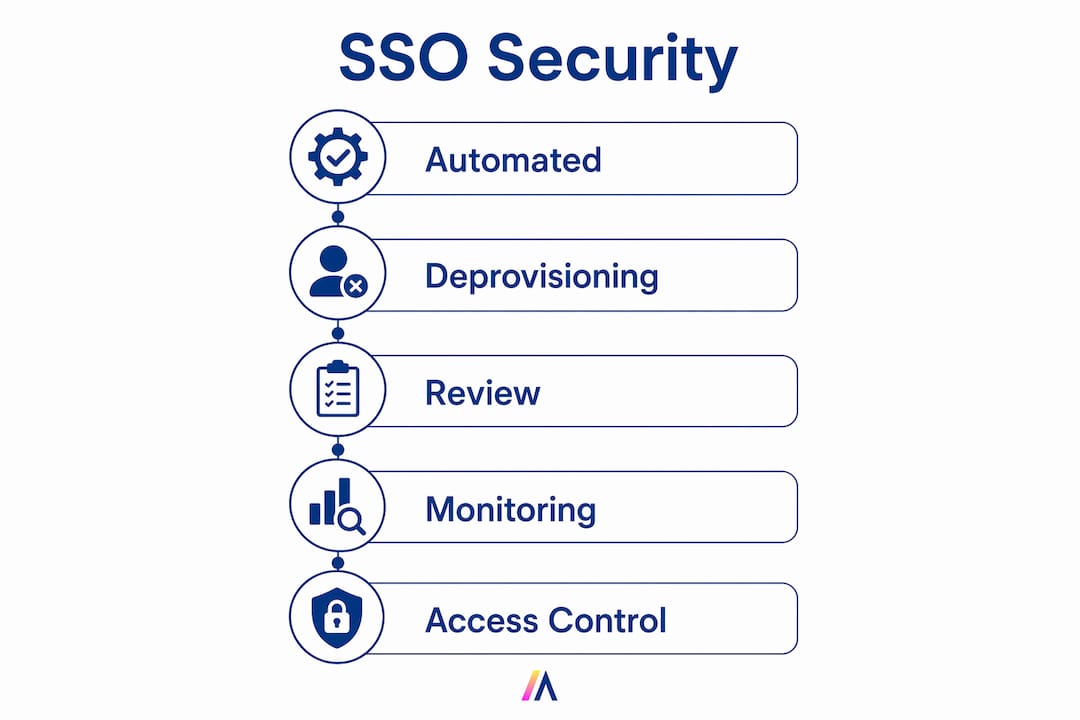
Configuring SSO is a one-time task. Keeping it secure is an ongoing discipline. The table below outlines the key management practices and the compliance frameworks they support.
| Practice | Why It Matters | Compliance Relevance |
|---|---|---|
| Automated deprovisioning via SCIM | Removes access immediately on offboarding | SOC 2, ISO 27001 |
| Audit logging of all SSO events | Creates a traceable record of who accessed what | SOC 2 Type II, GDPR |
| Conditional access policies with MFA | Blocks access from unmanaged or risky devices | NIST 800-63, ISO 27001 |
| Regular IdP group-to-role review | Catches privilege creep before it becomes a risk | SOC 2, internal policy |
| AI gateway or DLP layer on top of SSO | Monitors prompts and data uploads SSO cannot see | GDPR, sector-specific regs |
The last row in that table is the one most teams skip. SSO manages authentication but cannot monitor prompts, data uploads, or shadow AI usage. A user authenticated through Okta can still paste confidential data into an AI prompt. Pairing SSO with a data loss prevention (DLP) layer or an AI gateway closes that gap.
Shadow AI is the other persistent risk. Employees who find the SSO-gated platform inconvenient will find workarounds, typically consumer-tier AI tools that bypass your identity controls entirely. The answer is not more restrictions. It is making the governed platform fast and easy enough that the workaround is not worth the effort. Enterprise AI governance best practices consistently point to user experience as the primary driver of shadow AI adoption.
For role-based access control to work correctly over time, schedule a quarterly review of IdP group memberships and their mapped platform roles. People change teams, get promoted, and take on new responsibilities. Without that review, privilege creep accumulates silently until an audit surfaces it.
A successful SSO deployment on an enterprise AI platform requires protocol compatibility, correct IdP configuration, role mapping, and an ongoing governance layer that extends beyond authentication alone.
| Point | Details |
|---|---|
| Verify protocol support first | Confirm your AI platform’s enterprise tier supports SAML 2.0 or OIDC before starting configuration. |
| Prefer OIDC for new deployments | OIDC’s JWT tokens are lighter, easier to debug, and better suited to modern AI agent architectures than SAML. |
| Enable JIT provisioning and SCIM | JIT handles onboarding automatically; SCIM handles deprovisioning to prevent orphaned accounts after offboarding. |
| Map IdP groups to platform roles | Role mapping is what converts authentication into granular access control inside the AI environment. |
| Layer AI governance on top of SSO | SSO cannot monitor prompts or data uploads; add a DLP or AI gateway to achieve full visibility. |
I have worked through enough enterprise AI deployments to say this plainly: the teams that treat SSO as the finish line are the ones who end up in front of an auditor explaining a data incident.
SSO is the right starting point. It delegates authentication to a trusted IdP, enforces MFA, and automates the user lifecycle. Those are real, measurable security gains. But the moment a user authenticates and opens a prompt window, SSO has done its job and gone quiet. What happens next, what data gets pasted, what outputs get exported, what agents get triggered, is completely invisible to your IdP.
The trend I am watching closely in 2026 is the shift toward OIDC as the default for new AI platform integrations. SAML still works, and you will maintain it for legacy systems for years. But every new AI tool you onboard should be evaluated for OIDC support first. The debugging experience alone is worth it. Reading a JWT in a browser tool takes seconds. Parsing a SAML XML assertion takes patience and a good XML editor.
The other lesson I keep relearning is that identity provider integrations need continuous evaluation, not just initial setup. Okta, Azure AD, and Ping Identity all update their conditional access engines regularly. A policy that was correctly configured in January may behave differently after a platform update in September. Build a quarterly review into your calendar and treat it like a patch cycle.
— Matthieu
Hymalaia is built for exactly this challenge. The platform supports native SAML 2.0 and OIDC integration out of the box, connecting directly with Okta, Azure AD, Ping Identity, and OneLogin through a self-serve configuration portal that IT teams can manage without vendor support tickets. Automated JIT provisioning and SCIM-based deprovisioning handle the full user lifecycle. Centralized RBAC maps your IdP groups to precise platform roles across all 50+ connected data sources, from Salesforce to SharePoint. Built-in audit logging supports SOC 2 and GDPR compliance requirements. And Hymalaia’s AI governance layer monitors agent activity beyond the authentication boundary, giving your security team the full platform visibility that SSO alone cannot provide. See how it works at Hymalaia’s enterprise AI platform.
Enterprise SSO for AI tools is the integration of a corporate identity provider (such as Okta or Azure AD) with an AI platform so users authenticate once through the corporate directory and gain access without separate credentials. It enforces MFA, conditional access, and automated deprovisioning across all connected AI applications.
Enterprise AI SSO runs on SAML 2.0 and OpenID Connect (OIDC). OIDC is preferred for new AI platform deployments because it uses lightweight JSON Web Tokens and offers simpler debugging than SAML’s XML-based assertions.
Just-in-Time provisioning automatically creates a user account in the AI platform the first time a user logs in via SSO, eliminating manual account setup. This improves onboarding speed and keeps user records synchronized with the corporate directory.
SSO secures authentication but cannot monitor user activity inside the AI tool, including prompts, data uploads, or agent actions. Full security requires pairing SSO with a DLP layer, AI gateway, or prompt monitoring solution.
Use SCIM (System for Cross-domain Identity Management) provisioning alongside SSO to automate deprovisioning. Without SCIM, offboarded users can retain access for weeks due to manual revocation delays, creating a direct security exposure.
