TL;DR:
- Manual data analysis is slow, inconsistent, and struggles to scale with growing data volumes. Gemini AI integrated into Google Sheets offers a faster, more accurate, governance-ready solution for enterprise data workflows. Proper setup, security controls, and validation processes are essential to maximize AI benefits and ensure reliable, compliant analysis at scale.
Enterprise data teams know the frustration well: a critical report is due, five analysts are buried in spreadsheet formulas, and someone just found a data entry error that invalidates three hours of work. Manual data analysis in Google Workspace is slow, inconsistent, and scales poorly as data volumes grow. The good news is that Gemini AI, now deeply integrated into Google Sheets and the broader Workspace ecosystem, offers a practical path to faster, more accurate, and governance-ready analysis workflows. This guide walks you through every stage, from confirming readiness to scaling confidently across your organization.
Step-by-step: Automating data analysis with Gemini AI in Sheets
Validating, monitoring, and scaling your AI-driven workflows
Why AI-driven data workflows are only as strong as your process
| Point | Details |
|---|---|
| Admin-enabled AI features | Gemini and advanced AI automation must be activated by Workspace admins and tied to strong governance. |
| Human validation is essential | Even with high benchmark results, all AI analyses require expert review before trust and scaling. |
| Security controls matter | Proper data loss prevention, logging, and segmentation protect your enterprise and ensure compliance. |
| AI accelerates, not replaces | Well-designed workflows boost speed and reduce errors but always pair automation with process discipline. |
Once you know the challenge, it’s critical to confirm you’re prepared with the right tools and permissions before writing a single prompt.
Getting AI-powered analysis off the ground in Google Workspace is not simply a matter of opening Sheets and typing a question. Enterprise environments require deliberate setup. Gemini in Google Sheets provides enterprise-grade AI-native spreadsheet editing for data analysts, but that capability sits behind several administrative gates you need to clear first.
Minimum requirements to get started:
Google Workspace edition: Gemini AI features require a Business Standard, Business Plus, Enterprise Standard, or Enterprise Plus license. Confirm your organization’s current tier before planning rollout.
Admin enablement: Gemini Alpha features must be enabled by an administrator for Workspace users. This is not automatic, even on eligible plans.
Data Loss Prevention (DLP) policies: Ensure DLP rules are configured to prevent sensitive data from being inadvertently processed or exposed through AI prompts.
Identity and access management: Role-based access controls (RBAC) should be reviewed and tightened so only authorized analysts interact with AI features on sensitive datasets.
Audit logging: Enable Google Cloud audit logs to capture all AI-assisted actions for compliance and incident review.
The table below summarizes the core prerequisites your IT team should verify before any pilot begins.
| Requirement | Tool or setting | Owner |
|---|---|---|
| Gemini AI license | Workspace Admin Console | IT Admin |
| Gemini Alpha enablement | Admin Console > Apps > Gemini | IT Admin |
| DLP policy configuration | Google Workspace DLP | Security Team |
| RBAC review | Cloud IAM | IT Admin |
| Audit logging | Google Cloud Logging | IT / Compliance |
| Data classification | Drive labels | Data Governance Lead |
Explore the full range of AI data analysis features available to enterprise teams to map what your organization can realistically activate in the first 30 days.
Pro Tip: Before rolling out to your entire analyst team, create a dedicated pilot group of 5 to 10 users in the Admin Console. Assign Gemini Alpha access only to that group initially. This lets you observe real usage patterns, catch governance gaps, and refine your DLP policies without exposing the entire organization to untested configurations.
As your confidence grows, you will also want to evaluate more advanced options. Autonomous AI agents that operate across Workspace, Salesforce, Slack, and other enterprise tools represent the logical next step beyond single-tool automation.
With tools and permissions in place, you’re ready to launch your first AI-powered analysis workflow.
The process below is designed to be repeatable. Run it once as a pilot, document every decision, and you will have a template your entire data team can follow.
Open your dataset in Google Sheets. Start with a clean, well-labeled dataset. Column headers should be descriptive, data types should be consistent, and any known errors should be resolved before you involve AI. Garbage in, garbage out applies here as much as anywhere.
Activate the Gemini side panel. In Sheets, click the Gemini icon in the top-right toolbar. If it does not appear, confirm that your admin has enabled Gemini Alpha for your account.
Write a scoped analysis prompt. Be specific. Instead of “analyze this data,” try “Identify the top five product categories by revenue for Q1 2026 and flag any category where month-over-month growth dropped below 5%.” Specificity dramatically improves output quality.
Review the suggested formulas or summaries. Gemini will propose formulas, pivot structures, or natural language summaries. Do not accept them blindly. Read the logic, verify the cell references, and check that the output matches your business definition of the metric.
Run a parallel manual check on a sample. Select 10 to 20 rows and verify the AI output against a manual calculation. This step is non-negotiable for any output that will influence a business decision.
Iterate with follow-up prompts. AI analysis is conversational. If the first output is directionally correct but incomplete, follow up: “Now break that down by sales region and show the variance from the prior quarter.”
Export or document the validated output. Once validated, lock the output range, add a review timestamp, and note which analyst signed off. This creates an audit trail that your compliance team will thank you for.
Important: Agentic spreadsheet automation should always include human-in-the-loop review before outputs impact production. No AI workflow is error-free, and the cost of an unreviewed error reaching a board report or financial system is far higher than the time saved by skipping validation.
Gemini achieved a 70.48% success rate on SpreadsheetBench for real-world editing, which is impressive but also means roughly 3 in 10 complex tasks will need correction. Build that expectation into your process design from day one.
The table below shows what changes when you move from a manual to an AI-assisted workflow.
| Dimension | Manual process | AI-assisted with Gemini |
|---|---|---|
| Time to first insight | 2 to 4 hours | 15 to 30 minutes |
| Formula error rate | 5 to 10% (human entry) | Lower, but not zero |
| Analyst oversight needed | Continuous | Targeted review at key steps |
| Scalability | Limited by headcount | Scales with prompt quality |
| Audit trail | Manual documentation | Partially automated via logs |
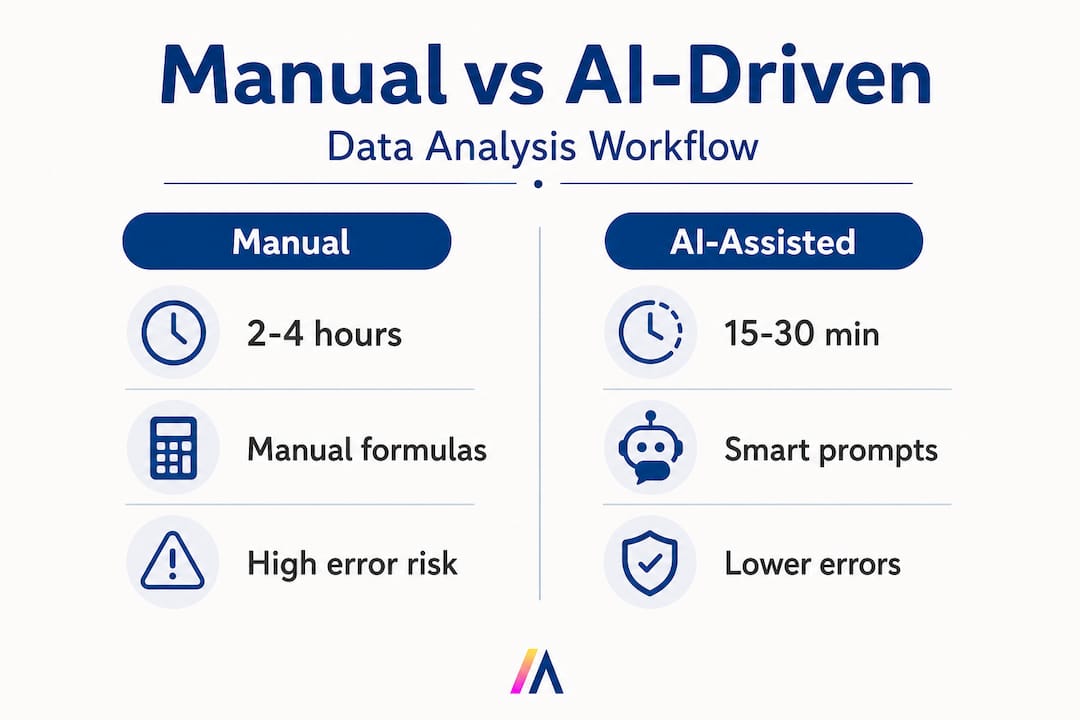
Pro Tip: Build a shared prompt library in Google Docs or a Notion page where your team saves validated, reusable prompt templates. A prompt that reliably extracts churn risk signals from your CRM export, for example, is a reusable asset. Treat it like code: version it, review it, and update it when your data schema changes. Pair this with AI integration in Workspace to keep your prompt library connected to live data sources.
Applying automation safely requires thoughtful security and compliance integration, not just fast deployment.

AI features in Workspace are powerful, but they operate on your most sensitive business data. A prompt asking Gemini to summarize a dataset containing PII, financial projections, or proprietary customer information can create exposure if your controls are not configured correctly.
Essential policies and controls to implement:
DLP rules for Sheets: Configure policies that detect and block prompts or outputs containing sensitive data patterns such as Social Security numbers, credit card numbers, or internal project codes.
Information Rights Management (IRM): Apply IRM controls to restrict downloading, copying, or sharing of AI-generated outputs from sensitive files.
Admin segmentation: Use organizational units (OUs) in the Admin Console to limit Gemini access to specific teams or roles. Not every user needs AI features on every dataset.
Prompt logging: Enable logging of Gemini interactions where your data residency and compliance requirements allow. This creates a record for security audits.
Third-party app review: If you use Apps Script or third-party add-ons alongside Gemini, review their OAuth scopes and ensure they comply with your data handling policies.
Regular access reviews: Schedule quarterly reviews of who has Gemini Alpha access and whether their current role still justifies it.
Governance is not optional. Enterprise security controls including DLP and IRM, admin enablement options, and Google Cloud IAM and logging best practices support responsible use of Workspace AI. Organizations that skip this layer often discover the gap only after an incident. Build the controls first, then expand access.
Google Cloud Platform IAM integrates directly with Workspace, allowing you to apply fine-grained permissions at the project, dataset, and resource level. Use Cloud Audit Logs to capture who accessed what, when, and through which AI feature. This is especially important in regulated industries where demonstrating data lineage is a compliance requirement.
For teams evaluating broader deployment, reviewing secure deployment considerations for enterprise AI platforms will help you map Workspace controls against your organization’s existing security framework.
Securing automated processes is only the start. Next, maintain value and trust as you roll out more broadly.
Validation is where many enterprise AI projects stumble. Teams move fast during the pilot, see promising results, and then scale before the validation process is mature. The result is errors in production reports, eroded analyst trust, and sometimes a full rollback.
A stepwise validation approach:
Single reviewer for initial output. The analyst who ran the prompt reviews the output against the source data and documents any discrepancies.
Peer review for business-critical outputs. A second analyst independently checks any output that will be used in executive reporting, financial planning, or customer-facing materials.
Automated anomaly detection. Use Google Sheets conditional formatting or Apps Script to flag outputs that fall outside expected statistical ranges. For example, if revenue figures jump 300% week-over-week, that should trigger a review alert before the report is distributed.
Periodic audit of AI-assisted reports. On a monthly basis, pull a random sample of AI-assisted outputs and compare them to manually calculated equivalents. Track your error rate over time.
Monitoring best practices:
Set up Google Cloud Monitoring alerts for unusual API call volumes, which can indicate runaway automation or unauthorized use.
Log all Gemini-assisted edits with a timestamp and user ID for traceability.
Create a shared incident log where analysts record any AI output errors they catch, along with the prompt that generated them. This feeds directly into prompt improvement.
| Common issue | Root cause | Mitigation strategy |
|---|---|---|
| Incorrect formula references | Ambiguous column names in prompt | Standardize header naming conventions |
| Hallucinated data points | Prompt too broad or data context missing | Scope prompts tightly; provide explicit data ranges |
| Inconsistent metric definitions | No shared prompt library | Maintain a versioned, team-wide prompt template library |
| Compliance exposure | DLP not configured for AI outputs | Enforce DLP rules before enabling Gemini for sensitive files |
| Slow adoption | Analysts distrust AI outputs | Run validation workshops; show error rates improving over time |
Scaling from pilot to enterprise:
Start with one team and one use case. Document the time saved, the error rate, and the governance steps followed. Use that documentation as your internal business case for broader rollout. Feedback loops matter enormously here. Every analyst who catches an AI error and logs it is contributing to a smarter, more reliable process.
Pro Tip: Before running any AI workflow on live production data, execute a dry run using anonymized or synthetic data that mirrors your real dataset’s structure. This lets you stress-test your prompts, validate your DLP rules, and identify edge cases without any risk to actual business data. Monitor outcomes using dedicated AI workflow monitoring features to track performance over time.
Understanding the steps is important, but realizing why they matter takes a deeper look.
Here is the uncomfortable truth most AI adoption guides skip: the technology is rarely the limiting factor. Gemini is capable. The Workspace integrations are mature. What determines whether your organization actually benefits is the quality of the process wrapped around the tool.
We see this pattern repeatedly. A team deploys Gemini in Sheets, runs a few impressive demos, and then pushes AI-generated outputs directly into their monthly board pack without a validation step. One quarter later, a formula error surfaces in a revenue projection. The AI gets blamed. The project stalls. The real culprit was the absence of process discipline, not the technology.
The contrarian insight here is this: enterprise results improve most when teams deliberately slow down and treat every AI output as a draft, not a deliverable. This sounds counterintuitive when the whole pitch is about speed. But speed without accuracy is just faster failure. The teams that achieve the greatest long-term gains are the ones that invest in validation frameworks early, before they scale.
Leadership accountability is another underappreciated factor. Investing in practical AI features and training is necessary, but it is not sufficient. Someone in your organization needs to own the governance framework, review the audit logs, and make the call when an AI workflow needs to be paused or redesigned. Without that accountability structure, even well-designed workflows drift.
The teams that win with AI are not the ones who move fastest. They are the ones who move deliberately, build trust in their outputs incrementally, and treat process design as a competitive advantage.
If you’re motivated to apply or expand on these methods, the journey doesn’t stop with Google Workspace.
Google Workspace with Gemini is a strong foundation, but enterprise data teams often need to connect analysis workflows across Salesforce, SharePoint, Slack, and dozens of other tools simultaneously. That is where a purpose-built enterprise AI platform like Hymalaia 🏔️ accelerates the path from pilot to production.
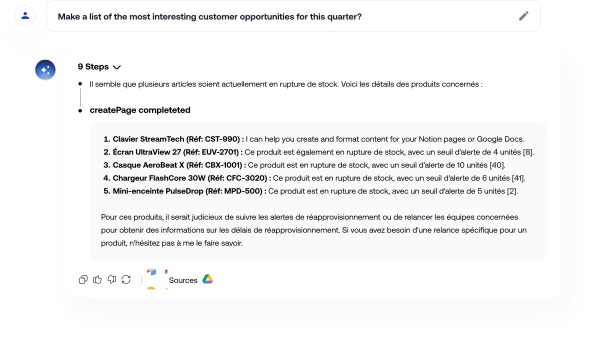
Hymalaia deploys autonomous AI agents that unify data across your entire tool stack, automate complex multi-step workflows, and surface insights in real time, all within a GDPR-compliant, role-based access environment. Whether you need cloud, on-premise, or hybrid deployment, the platform adapts to your security requirements. Explore the full suite of agent automation features or connect with our team through AI consulting and training to design a workflow strategy tailored to your organization’s data landscape. Book a demo and see what always-in-sync AI looks like at enterprise scale.
A Workspace admin must turn on Gemini Alpha for all users or specific groups via the admin console. Access can be scoped to organizational units to limit rollout during a pilot phase.
Features like DLP and IRM controls ensure data loss prevention and restrict sensitive information management during AI workflows. Google Cloud IAM and audit logging add additional layers of traceability and access control.
Gemini reached a 70.48% success rate on the SpreadsheetBench benchmark for real-world editing and analysis tasks. This means human review remains essential for complex or high-stakes outputs.
Yes. Organizations should implement human-in-the-loop review before relying on AI outputs in production environments. Validation steps should be documented and assigned to specific team members to ensure accountability.
